Computers are already in the clear from a virus or malware (worms, trojans, etc.), does not mean the computer is back to normal. Usually the impact after a computer virusenough so that some windows settings can not be accessed, such as Task Manager,Windows Registry, Folder Options and so forth. To fix the settings that we can use free software Re-Enable.
With just one click, then a variety of settings windows that can not be accessedbecause of the impact the virus will be returned to its original state (normal). Re-Enablethe use of very simple, because almost do not need an expert ability to use it. Re-Enable was made to restore various settings windows are usually modified by avirus, such as:
- Registry Editor ”regedit”
- Command console / prompt ”cmd”
- System Restore
- Start Menu, Run Command
- Task Manager
- Task Scheduler
- Safe Mode, run from the Tools menu
- Restore F8 Safe mode ”XP only” if ”NTLDR has been modified”
- Right-click menu (the menu contents)
- My Computer Properties
- Search in Windows Explorer and Folder Options menu
- MS Config (only win xp)
- Restore the registry key explorer
- and various other features
Make sure that the computer had been free of the virus to get the desired results. Because if the computer is still exposed to the virus (the virus is still active), after the switch to Re-Enable, the possibility of setting will be changed again by the virus.
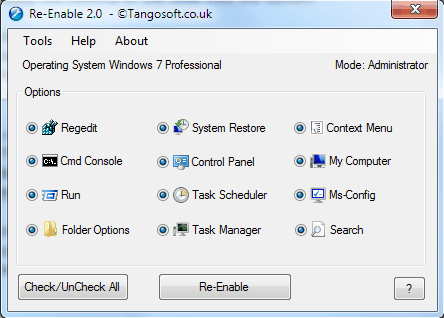
Re-Enable was developed by Microsoft. Net Framework, so to run it on a computer must be installed Microsoft. NET Framework 3.5 SP1 or above. But for those who do not exist. net, there are also versions that have been included. net in it, just that size is quite large (about 22.8 MB)
If the computer is installed. Net 3.5 SP1, so we stayed Lite download Re-Enable the size about 773 KB only.
Download : Re-Enable


{ 0 komentar... read them below or add one }
Posting Komentar